
[Home] [Puzzles & Projects] [Delphi Techniques] [Math topics] [Library] [Utilities]
|
[Home] [Puzzles & Projects] [Delphi Techniques] [Math topics] [Library] [Utilities]
|
|
Here is how it works:
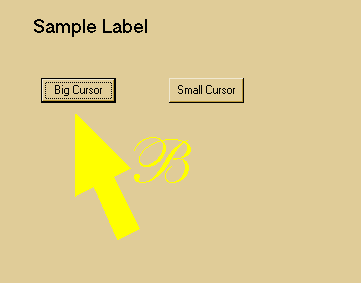
That's the bulk of it. José's 128 x 128 cursor image was much better than my test cursor so I'm using it in this demo. He says the "B" stands for "Ballantines", an English whiskey, and he is using it in a computerized board game to be played at discos and pubs. Since form painting precedes drawing controls, the cursor disappears behind buttons and other TWinControl descendants. Activating the OnMouseMove exits for the controls will keep the cursor positioned accurately. For some reason the big cursor will appear on top of TGraphicControl controls (e.g. TLabels and TImages) - I haven't figured that one out yet. For the other controls, the big cursor reverts to the small cursor while over the control, which might be an acceptable way to handle the situation. Download source
|
[Feedback] [Newsletters (subscribe/view)] [About me]Copyright © 2000-2018, Gary Darby All rights reserved. |



 José
Hernandis sent me an email a few weeks ago asking for advice on
using cursors larger than the standard 32 x 32 bit. It seems that
Windows and/or PC hardware does not support larger cursors, at least
not that I could track down. I developed a model using sprite
processing concepts to move a bitmap image around on the screen and which José
successfully adapted for his application.
José
Hernandis sent me an email a few weeks ago asking for advice on
using cursors larger than the standard 32 x 32 bit. It seems that
Windows and/or PC hardware does not support larger cursors, at least
not that I could track down. I developed a model using sprite
processing concepts to move a bitmap image around on the screen and which José
successfully adapted for his application. 
