Search
As of October, 2016, Embarcadero is offering a free release
of Delphi (Delphi
10.1 Berlin Starter Edition ). There
are a few restrictions, but it is a welcome step toward making
more programmers aware of the joys of Delphi. They do say
"Offer may be withdrawn at any time", so don't delay if you want
to check it out. Please use the
feedback link to let
me know if the link stops working.
Support DFF - Shop
If you shop at Amazon anyway, consider
using this link.
We receive a few cents from each
purchase. Thanks
Support DFF - Donate
If you benefit from the website, in terms of
knowledge, entertainment value, or something otherwise useful,
consider making a donation via PayPal to help defray the
costs. (No PayPal account necessary to donate via credit
card.) Transaction is secure.
Mensa®
Daily Puzzlers
For over 15 years
Mensa Page-A-Day calendars have provided several puzzles a year
for my programming pleasure. Coding "solvers" is most fun,
but many programs also allow user solving, convenient for "fill
in the blanks" type. Below are Amazon links to the
two most recent years.
Mensa®
365 Puzzlers Calendar 2017
Mensa®
365 Puzzlers Calendar 2018

(Hint: If you can
wait, current year calendars are usually on sale in January.)
Contact
Feedback:
Send an
e-mail with your comments about this program (or anything else).
|
| |
Introduction
Here is a program written by Ivan Sivak (aka Ivanoslav), a bright, young 16
year-old Delphi programmer from Czechoslovakia.
It contains 15 graphics effects demonstrations. I don't know that any
of them are original, but it is a fairly complete set of effects that can be
obtained; mostly, except for the first two text demos, by pixel
manipulation.
I added some user edit fields for values that Ivan had hard coded and made a
few other changes, but 90+% of the code is as he sent it.
Here are the effects:
 | Raised text. A clever way to give text a raised appearance by
drawing darker text offset lower and lighter text higher on the screen. |
| Rotated text. Using the logical font escapement field to
control the angle at which text is drawn. |
| Image selection. Copy a rectangle from one image to another. |
| Pixel color filtering. Remove Red, Green or Blue pixels from
an image (leaving the other two colors to form Cyan, Magenta, or Yellow). |
| Conversion to grayscale. Replaces colors in each pixel with a
weighted average of the three. The default weighting ( 0.2989 for red,
0.5866 for green, and 0.1145 for blue) is the NTSC standard that
reflects the apparent brightness sensitivity of the human eye; least sensitive
for green and most sensitive for blue. |
| Conversion to black and white. If the weighted average
of the three colors in a pixel is higher than a threshold value, make
the pixel white, otherwise make it black. |
| Pixel distribution. I have no idea what this is, but the it
makes an interesting picture. |
| Color inversion. Make the "negative" of a color
image by subtracting each color value from 255 for each pixel. |
| Change contrast and brightness. Here is where I made my most
significant contribution to the project. Ivan originally had only
two levels of contrast adjustment in his code. I generalized that to
multiple levels. In the process I noticed that images tends to get
darker as contrast in increased and decided that we also needed a brightness
adjustment. That led to a side trip into the world of HSV (hue,
saturation, value) color representation. This is also sometimes referred
to as the HSB; (hue, saturation, brightness) , system.
Adjusting brightness requires converting the RGB pixel value to the HSV system,
adjusting the "V" (brightness) and converting back to RGB.. |
| Making a relief image. Convert each pixel to a gray scale
constant plus the difference between the grayscale value of this pixel and the
pixel three pixels up and to the left. |
| Pixel sorting. Another one I did not look at much.
If anyone has any comments on it, I'll be happy to add them here. |
| Blob deformation. Replace the image with lots of randomly
placed ellipses colored by averaging the colors of some pixels within the
ellipse. |
| Blending 2 pictures together. Simply replace each pixel with
the weighted average of the two corresponding pixels in the original images.
The weighting may be constant or varied. The variation samples here are
based on the X coordinate to cause a fade-in or fade-out effect. |
| Sine wave deformation. Relocate each pixel based sine or cosine
function applied to the coordinates. |
| Bubble spot magnify deformation. This is one of the
screensaver effects in the MSPlus software package. Here we just
magnify an area around a clicked point. I haven't analyzed how or
why it works. It seems to relocate pixels a distance inversely
proportional to their distance from the clicked point. |
All-in-all, an impressive piece of work that I thought worth passing along,
Thanks Ivan, and good luck with your future endeavors. If you decide to
become a professional programmer, success seems very likely!
The source and executable code below each contain the two bmp images used.
Together they add about 400k to download sizes (400k for source and 600k for
executable.) The "original_picture.bmp" image is of
my kids about 35 years ago. Son Steve's kids especially, will be so
proud to see their Dad immortalized this way!
Addendum May 25, 2013: It's been nearly 10 years since the
original Graphics Effects program was posted - time for the first update.
A viewer submitted an efficiency improvement for the "Magnifier" effect which
magnifies a specified circular area of an image by a specified amount.
The original copied the entire image pixel by pixel, only changing those pixels
in the magnified area. The revised version copies the entire image first
and then only modifies the pixels in the magnified area, a much faster
operation. Version 2 posted today implements that change as well as
improved scaling for images which do not match the square image templates in the
program (a new LoadScaled procedure).
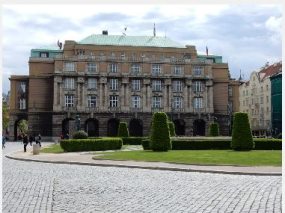
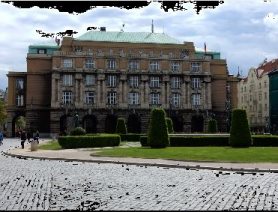
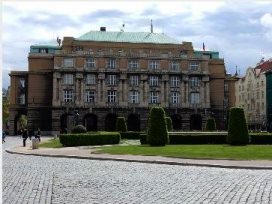
June 10, 2015:
 |
 |
 |
|
Original (Brightness=12) |
Before fix (Brightness=10) |
After Fix (Brightness=10) |
A second update today, this time to the Contrast/Brightness tab demo.
RGB (Red, Green, Blue) values are converted to the HSV (Hue, Saturation, Value)
color space, where arbitrary Contrast and and Brightness values are applied
and the result converted back to RGB for display. An error when all
three color values were equal (one of the 255 shades of gray) and brightness
less than 10, caused all 3 RGB values to be set to 0 resulting in black pixels.
This is most obvious when white cloud areas on a users image suddenly turned
black when brightness was decreased. Typical code change was from
"R=trunc(V)*255;" to "R=trunc(V*255);".
Parentheses do matter!
Browse/Download Source
Further Explorations
 |
We have not
worried much about speed in the code. Delphi Help says that
TScanLine is considerably faster than pixel by pixel manipulation.
And there are areas where I'm sure existing code could be made more efficient.
|
|
No real
animation or sprite effects here yet. |
| Created: August 25, 2003 |
Modified:
May 15, 2018
|
|